Keeping Claude tidy

Photo by Kelly Sikkema / Unsplash
I've started doing some quality of life tweaks to Claude Code that help me visually to keep things tidy across projects and tasks.
If you're the kind of person who's got 19458 unread emails in your inbox and can sleep at night, this is not for you.
If, on the other hand, you have to keep things tidy to avoid freaking out every morning, this might help.
I started grouping my sessions in Claude Code (I use the desktop version) by project. I try to keep 1-2 open tasks at the same time per project. When I'm done, I archive them if I want to keep that context, or I delete them if they're not useful, they broke or I ended up cancelling what I was doing. You can skip this part, but I like the feeling of taking the trash out every now and then.
Once tasks are complete, they are moved back to "ungrouped".
I, additionally, add ✅ if there's nothing else I can do in that task (for archived tasks), and ⛔️ for blocked tasks (in QA, pending access, etc.).
Example:
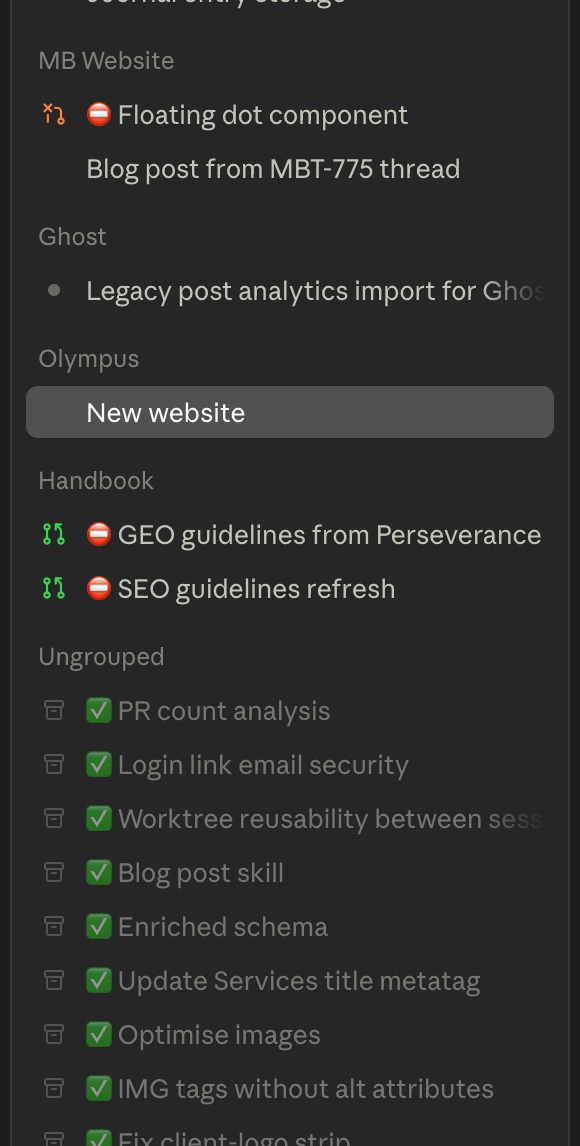
Much better, innit?